Posts

A stone's throw away

It has been our experience that many Windows desktop enhancements are more trouble than they're worth; they tend to slow down our system's performance, have unintuitive interfaces, and make the things they set out to enhance more complicated than ever. Krento is among the better desktop enhancements we've seen, but it's still far from perfect. Krento sets out to combine two things with which we're familiar from our experience as a Mac user: a dock and widgets. When not in use, Krento appears as an attractive, gently pulsing orb in the bottom corner of the desktop. Click on the orb and the Krento Stones Manager appears. This is a circular arrangement of 12 "stones," each of which represents a shortcut to an application, document, Web site, or other useful location. The Kento Application Ring is a stone within the manager that opens into a ring of its own, allowing you to group applications together in one place. In general, we liked Krento; it looks cool ...

Krento award on Software Informer

Image

Windows Magnification API .NET

Image
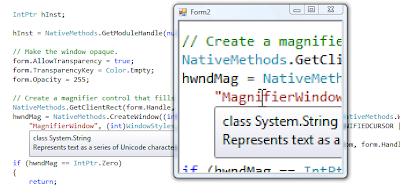
The Magnification API provides assistive technology vendors with the means for developing screen magnification applications for Windows Vista and later operating systems.The API enables you to display a simple control that magnifies a specified portion of the display by a specified factor. Images as well as text are displayed. Unfortunately, Microsoft provided only native C++ API functions without .NET equivalent, so I decided to make a simple .NET wrapper in C#. The full C# source code is available for download: http://users.telenet.be/serhiy.perevoznyk/download/Magnification.zip   The magnification class is based on native Windows API calls. Here is a small excerpt from the library sources: using System; using System.Collections.Generic; using System.Text; using System.Runtime.InteropServices; namespace Karna.Magnification { internal static class NativeMethods { public const string WC_MAGNIFIER = "Magnifier"; [DllImport("user32.dll...

The classic Tetris game as Windows Forms control

Image
This is just plain old Tetris, written in C# and implemented as a Windows Forms control,  so you can insert it in your own .NET application. I assume you have played Tetris before and know the rules of this simple but interesting game. Download full source code: http://users.telenet.be/serhiy.perevoznyk/download/Karna.Tetris.zip

Japanese Krento

Image
The new release of Krento with support of Japanese language is available for download from http://www.krento.net

Krento 1.6.25.28 release

Image
New version of Krento is available for download from http://www.krento.net This time not only x86 and x64 versions are available, but the special Itanium edition as well: http://users.telenet.be/serhiy.perevoznyk/download/krentoi64_setup.exe There are few bugs fixed: * Invisible controls focusing in the options dialog * Setting of the working directory for the executables * Relative path to the target for the portable edition All these problems were reported via Krento Support Forum http://krento.eamped.com   To solve the problem with relative paths in the portable version of Krento I introduced the new environment variable %KRENTO_DRIVE% that points to the current USB drive from which Krento is running. Now you can specify the name of the file like %KRENTO_DRIVE%\AIDA\aida32.exe. If your USB drive has the drive letter F: assigned, for example, then %KRENTO_DRIVE% value is equal to F: (without backslash).

Krento user manual is online

The first version of the Krento user manual is available online: http://users.telenet.be/serhiy.perevoznyk/manual/index.html The manual will be also included in Krento setup and available offline starting from the next release of Krento. Now the users should have less questions how to use Krento features. And the support forum can be used as an additional informational resource http://krento.forumer.com Update 30.11.2011 The new address of the Krento support forum is http://krento.eamped.com

Krento 1.6 release

Krento 1.6 released and available for download from http://www.krento.net Krento is a widget engine that supports 3 different types of widgets. One type that can do small, but useful actions, like launching applications, named "Krento Stones", another one that has more decorative purposes named "Krento Toys". "Krento Toys" are similar to Google Gadgets or Windows Sidebar widgets. This naming convention helps to avoid misunderstanding when downloading and installing different types of Krento widgets. In addition Krento supports RocketDock docklets , but places it directly to the desktop the same way as "Krento Toys". Release information: * Automatically checks for new Krento releases * Added support for RocketDock docklets * Added possibility to select a folder (not only file or shortcut) as a target for "File Launcher" stone * Added configuration screen to all types of Krento Stones RocketDock docklets support You can ad...

Extending Krento functionality using Krento Toys

Image
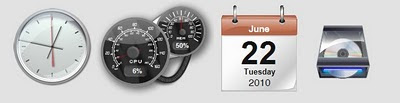
Krento widgets designed to run on your desktop ( Krento Toys ). Widgets are desktop toys to entertain and to inform. Think of them like things you’d put on a real desk: a picture frame, a newspaper or live goldfish! But they’re on your PC desktop, not your real desk. You’ll get it once you see it. They could be a fun addition to your boring computer. Download Krento Toys from http://krento.forumer.com

Selecting Folder in Krento

Krento 1.5.246.17 release

Krento 1.5.246.17 is available for download from http://www.krento.net Release information Multilingual release. The following languages are supported: English   Translator: Serhiy Perevoznyk Dutch     Translator: Sven Wyns Spanish   Translator: Sven Wyns Portuguese   Translator: Knight Rider (SoQuadrinhos) Russian      Translator: Ded2007 French Belgium   Translator: Jacques Putseys French France    Translator: Paul Van Muysewinkel Romanian   Translator: Oxana Rojcova German Translator: Andreas Pitzer Latvian Translator: Juris "3Dman" Perkons Added possibility to select a folder (not only file or shortcut) as a target for "File Launcher" stone Extended Pulsar popup menu for more easy setup of Krento Stones, Toys and Skins A lot of small improvements (visit Krento support forum http://krento.forumer.com for details) Update 30.11.2011 The new address of the Krento support forum is http://...

Download extra Krento Stones

Krento comes with 15 embedded Stones (special Krento widgets), but this set can be extended by downloading and installing additional Stones. New Stones are available for download: Krento Data Folder Stone http://users.telenet.be/serhiy.perevoznyk/krento/KrentoDataFolder.stone Open / close CD tray Stone http://users.telenet.be/serhiy.perevoznyk/krento/CDTrayStone.stone How to install Krento Stones? Download Krento Stone to your PC Launch Krento Drag and drop stone to Krento Pulsar You need Krento 1.5 installed to use this functionality.

Krento GoldFish Toy

Krento Goldfish Toy is available for download: http://users.telenet.be/serhiy.perevoznyk/krento/GoldFish.toy For using this Krento Toy you need Krento 1.5 installed.

Krento 64 bit edition - 5 stars award on Best Software 4 Download

Image
Krento 64 bit edition has been reviewed by Best Software 4 Download and got 5 stars award

Krento screenshot

Image
Krento as a part of HTPC desktop.

Parlement ontbonden, verkiezingen op 13 juni

Image
Kamer en Senaat hebben donderdagavond de lijst met grondwetsartikels goedgekeurd die in de volgende legislatuur voor herziening vatbaar zijn. De ministerraad heeft de datum voor de komende federale verkiezingen vrijdagochtend officieel vastgelegd op 13 juni . Het leek al langer 13 juni te worden, maar dat ligt nu ook officieel vast, bevestigde uittredend premier Yves Leterme vrijdag na afloop van de ministerraad

Krento CPU Information Toy

Image
Krento CPU Information toy is available for download: http://users.telenet.be/serhiy.perevoznyk/krento/CPUInfo.toy You need Krento 1.5 installed to run this toy. You can download more toys from Krento forum: http://krento.11.forumer.com/viewforum.php?f=14 Update 30.11.2011 The new address of the Krento support forum is http://krento.eamped.com

Krento Clock Toy

Image
New Krento "Clock" toy is available for download. You need Krento 1.5 to run it. http://users.telenet.be/serhiy.perevoznyk/krento/VistaClock.toy More Krento toys you can find on Krento forum: http://krento.11.forumer.com/viewforum.php?f=14 Update 30.11.2011 The new address of the Krento support forum is http://krento.eamped.com

How to install Krento toy

KissMe: very first Krento toy is available for download

Image
KissMe: very first Krento toy is available for download What is "Krento Toy"? It is a small, lightweight single-purpose application, or software widget , that can sit on a Microsoft Windows user's computer desktop. Why Krento uses word "Toy" in place of "widget"? Krento is a widget engine that supports 2 different types of widgets. One type that can do small, but useful actions, like launching applications, named Krento Stones and another one that has more decorative purposes named Krento Toys . It helps to avoid misunderstanding when downloading and installing different types of Krento widgets.