Posts

Krento 2.1.672.13 released

Krento 2.1.672.13 released and available for download from http://users.telenet.be/serhiy.perevoznyk/krento.html Reduced CPU usage during the circle rotation Added compatibility with Narrator for partially sighted people Fixed bug with the drawing of the complex skins Implemented smooth kinematic turning of the circle Central button shows now the list of the available rings for fast ring selection Windows + Z shows the ring selection even when Krento is not visible Added configuration parameter for the default number of the empty stones when creating the new circle. You can select the appropriate number or set it to 0 if you want to create an ampty circles always Added parameter to specify the name of the default circle (like the home page of the browser).  The home button can be used to navigate to the default circle The ico files can be used for stones images 

Update for Quricol library from Krzysztof Michalowski

Krzysztof Michalowski modified the code to load library dynamically. This allows you to run a program when there is no library. Here is the code provided to me by Krzysztof. unit QuricolCode; interface uses Windows, SysUtils, Classes, Graphics, Dialogs; type TQRCode = class public class procedure GenerateBitmap(const FileName : string; const Text : string; Margin : integer = 4; PixelSize : integer = 3); class procedure GeneratePng(const FileName : string; const Text : string; Margin : integer = 4; PixelSize : integer = 3); class function GetBitmap(const Text : string; Margin : integer = 4; PixelSize : integer = 3) : TBitmap; class procedure GetPng(Stream : TStream; const Text : string; Margin : integer = 4; PixelSize : integer = 3); end; implementation { TQRCode } class procedure TQRCode.GenerateBitmap(const FileName, Text: string; Margin, PixelSize: integer); type TGenerateBMPWProc = procedure (fileName: PWChar; text : PWCh...

Krento Screen Saver

Some time ago I received the request for Krento Screen Saver from one of the Krento fans and finally found free time to implement it. You can download freeware Krento Screen Saver from my site: http://users.telenet.be/ws36637/download/KrentoSaverSetup.exe

Krento Chrome Window Skin

Image
Stan Ragets designed a new skin for Krento: This skin is available for download from his website:  http://blog.stanragets.com/2012/01/18/chrome-window-krento-skin

ANSI version of the Quricol Delphi library

Last year I published the Quricol library for Delphi 2010 or better, but some users still need the support for older Delphi versions. As a result I made an update to Quricol library with support not only the Unicode, but also ANSI Delphi code. //=============================================================================== // Copyright (c) Serhiy Perevoznyk. All rights reserved. // THIS CODE AND INFORMATION IS PROVIDED "AS IS" WITHOUT WARRANTY // OF ANY KIND, EITHER EXPRESSED OR IMPLIED, INCLUDING BUT NOT // LIMITED TO THE IMPLIED WARRANTIES OF MERCHANTABILITY AND // FITNESS FOR A PARTICULAR PURPOSE. //=============================================================================== unit QuricolCodeAnsi; interface uses Windows, SysUtils, Classes, Graphics; type TQRCode = class public class procedure GenerateBitmap(const FileName : string; const Text : string; Margin : integer = 4; PixelSize : integer = 3); class procedure GeneratePng(c...

Quricol Delphi sample

Update 11.09.2013: Quricol 2.0 is available for download. More information about this version on http://delphi32.blogspot.com/2013/09/quricol-20-qr-code-generator.html program QuricolDemo; {$APPTYPE CONSOLE} uses SysUtils, Graphics, Classes, QuricolCodeAnsi in 'QuricolCodeAnsi.pas'; var bmp : TBitmap; MS : TMemoryStream; begin try //Generate Windows bitmap and save to file TQRCode.GenerateBitmap('delphi1.bmp', 'http://delphi32.blogspot.com'); //Generate PNG image and save to file TQRCode.GeneratePng('delphi1.png', 'http://delphi32.blogspot.com'); //Generate TBitmap bmp := TQRCode.GetBitmap('http://www.krento.net'); bmp.SaveToFile('delphi2.bmp'); //Generate PNG to the memory stream MS := TMemoryStream.Create; TQRCode.GetPng(MS, 'http://www.krento.net'); MS.Position := 0; MS.SaveToFile('delphi2.png'); MS.Free; ...

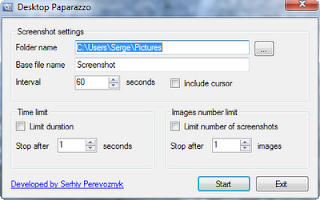
DesktopPaparazzo - freeware screen capture tool

Image
DesktopPaparazzo is a tool to help you capture difficult screenshots. Some elements are camera shy. Perhaps you want to capture a hint, popup or menu item but every time you press the print screen button your subject disappears from view.  Well DesktopPaparazzo is here to help, simply specify a time interval and a folder then DesktopPaparazzo will snap away and provide you with a collection of screen shots leaving you free to set up the screen how you want it. DesktopPaparazzo is extremely easy to configure, you can even decide whether you want to capture the mouse pointer in your screenshot. Download DesktopPaparazzo: http://users.telenet.be/ws36637/download/DesktopPaparazzoSetup.zip   Watch Desktop Paparazzo Video Tutorial done by Softoxi.com.  

SimpleLogoff - one click logoff from Windows

SimpleLogoff is an open source freeware application for one click logoff from Windows. Download link: https://skydrive.live.com/redir.aspx?cid=b4508367face85d1&resid=B4508367FACE85D1!215&parid=B4508367FACE85D1!134 By executing this application you are logged out without any questions asked. The application is portable, no any setup needed. The source code is included.

Quricol - QR code generator library

Image
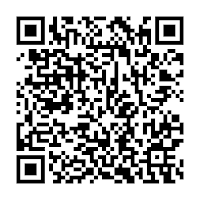
Quricol is an open source freeware QR code generator library for C++, Microsoft .NET and Delphi based on qrencode - QR Code encoder by Kentaro Fukuchi.The library contains methods to save the generated image to Bitmap or PNG file or generate images on-fly and save it to the stream. Both 32 and 64 bits compiled versions available along with source code. Download :  https://github.com/perevoznyk/quricol A QR code (abbreviated from Quick Response code) is a type of matrix barcode (or two-dimensional code).

C++ library for working with streams

For one of my internal projects I made a small C++ library for working with different types of streams. The main library classes are CMemoryStream, CFileStream and CResourceStream. The source code is available for download from my website: http://users.telenet.be/serhiy.perevoznyk/download/GevixLib.zip

How to check Windows version in C++

BOOL WINAPI IsWindows7() { OSVERSIONINFOEX osvi; DWORDLONG dwlConditionMask = 0; int op=VER_GREATER_EQUAL; // Initialize the OSVERSIONINFOEX structure. ZeroMemory(&osvi, sizeof(OSVERSIONINFOEX)); osvi.dwOSVersionInfoSize = sizeof(OSVERSIONINFOEX); osvi.dwMajorVersion = 6; osvi.dwMinorVersion = 1; // Windows 7 // Initialize the condition mask. VER_SET_CONDITION( dwlConditionMask, VER_MAJORVERSION, op ); VER_SET_CONDITION( dwlConditionMask, VER_MINORVERSION, op ); // Perform the test. return VerifyVersionInfo(&osvi,VER_MAJORVERSION | VER_MINORVERSION,dwlConditionMask); } BOOL WINAPI IsWindowsVista() { OSVERSIONINFOEX osvi; DWORDLONG dwlConditionMask = 0; int op=VER_GREATER_EQUAL; // Initialize the OSVERSIONINFOEX structure. ZeroMemory(&osvi, sizeof(OSVERSIONINFOEX)); osvi.dwOSVersionInfoSize = sizeof(OSVERSIONINFOEX); osvi.dwMajorVersion = 6; // Initialize the condition mask. VER_SET_CONDITION( dwlConditionMask, VER_...

PI Download: PDF Gallery

Image

Krento 2.1.333.12 released

Krento 2.1.333.12 released and available for download from http://users.telenet.be/serhiy.perevoznyk What's new in this release: Polish translation by Andrzej Improved Romanian translation by Radu Barbu Extended drag-and-drop support for Krento Pulsar:    - when dragging .doc;.xls;.ppt;.docx;.docm;.xlsx;.xlsm;.pptx;.pptm;.vso;.vsd;.mpp;.pub;.xsn;.txt;.rtf;.pdf;.html;.htm;.chm file to Pulsar it will be copied to "My Documents" folder   - when dragging .jpg;.jpeg;.jpe;.gif;.tiff;.tif;.png;.bmp;.rle;.dib;.wmf;.wmz;.emf;.emz;.cgm;.pict;.pic file to Pulsar it will be copied to "My Pictures" folder   - when dragging .wma;.mp3;.acc;.aiff;.wav;.ra;.mid file to Pulsar it will be copied to "My Music" folder

Polish translation of Krento

Andrzej translated Krento to Polish You can download the Polish translation of Krento here: http://users.telenet.be/serhiy.perevoznyk/download/pl-PL.lng

Krento 2.1.299.25 released

Krento 2.1.299.25 released and available for download from http://users.telenet.be/serhiy.perevoznyk What's new in this release:  New design from Stan Ragets  Improved setup  Decreased memory usage  Increased drawing speed for Krento stones  Fixed Windows shortcut icon resolving method

Disk Usage Krento Toy

This toy allows you to see the usage of a selected drive as a percentage of capacity. Is the glass half full or empty? Download : http://users.telenet.be/serhiy.perevoznyk/krento/DirUsage.toy Author: James Rimell

Metal Mesh Skin

Image
Stan Ragets created a very beautiful skin for Krento It is available for download here . The Fine Art of Stan Ragets Graphic Design by Stan Ragets

Krento 2.1 release

Image
Krento 2.1 is available for download from http://users.telenet.be/serhiy.perevoznyk/manual/download.html . In this release I added the possibility to select the style of the manager window. You can choose between the classic layout with the stone caption in the middle of the manager window or the new style with navigation buttons (more practical for netbooks and tablet pc). The seletion of the style can be done via the advanced settings dialog. Do not forget to restart Krento to apply your changes. Krento 2.1 supports skinning of the manager window buttons More information about new skinning options you can find on the Krento forum

Generate Excel files without using Microsoft Excel (Part 2)

After publishing my article on CodeProject I received a lot of questions how to change the font, alignment or color of the cells in the resulting Excel file. I improved the code of the ExcelWriter library and added the possibility to format cells. You can download the new release of the ExcelWriter library here: http://users.telenet.be/serhiy.perevoznyk/download/XLSExportDemo.zip Update from 31 Jan. 2012: This code is provided to show the possibility of easy export of the information to Excel files, not to manipulate existing Excel files or performing the complex formatting operations. The aim of this demo is to make the export easy and simple. In case if you do more complex tasks I can recommend to use another library, for example http://www.smartxls.com/index.htm. I do not have any plans to extend the provided code in the future. namespace XLSExportDemo { class Program { static void Main(string[] args) { ExcelDocument document = ...

PDF Gallery - freeware JPEG to PDF converter

Image
PDF Gallery is a freeware images to PDF converter. PDF Gallery is a very simple to use, but powerful file conversion tool designed to convert the JPEG, PNG and BMP images into PDF files. Running PDF Gallery does not require any Adobe or image processing programs installed on your computer. It has no extra dependencies and can work in portable mode. PDF Gallery can convert every image to a separate PDF file or combine multiple images to one PDF file in portrait or landscape layout. It works very fast the size of the resulting PDF file and its quality can be controlled by the user. PDF Gallery supports drag and drop, image stretch, page orientation and offset, images order and other useful features. It is compatible with Windows XP, Windows Vista and Windows 7. If you like this tool, please help me by link back to this site on your blog or your friend site. You can download more freeware applications from http://delphi32.blogspot.com/p/freeware-downl...